
Shinkansen is a fast, customizable and easily expandable terminal theme
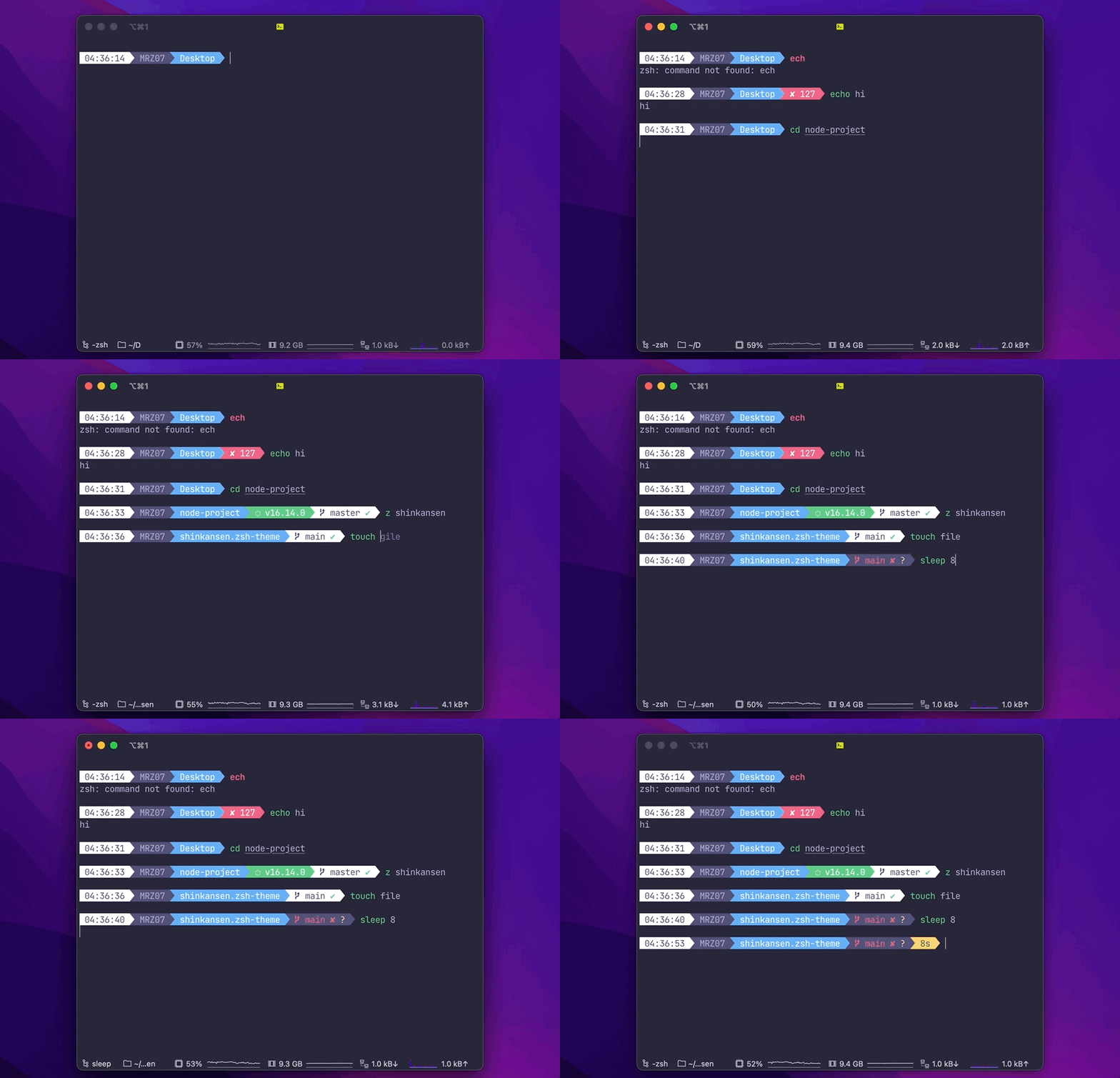 ## Features It currently shows: - Current Python version when using virtualenv otherwise the installed version - Current Ruby version using chruby; version and gemset when on RVM or Rbenv - Current Node.js version - Current Java version - Current Go version - Current Perl version using plenv - Current Elixir version - Git status - Time in 12h or 24h format - Current directory - Custom Message - Exit code of last command - Execution time of command And much more... If you want add some new feature, of fix some bug, open an issue and lets hack together. ## Requirements In order to use the theme, you will first need: - Powerline compatible fonts - On Ubuntu like systems you'll need the `ttf-ancient-fonts` package to correctly display some unicode symbols that are not covered by the Powerline fonts above. - A ZSH framework like [oh-my-zsh](https://github.com/robbyrussell/oh-my-zsh), [antigen](https://github.com/zsh-users/antigen) or [zgenom](https://github.com/jandamm/zgenom). - Make sure terminal is using 256-colors mode with `export TERM="xterm-256color"` - For [iTerm 2](http://iterm2.com/) users, make sure you go into your settings and set both the regular font and the non-ascii font to powerline compatible [fonts](https://github.com/powerline/fonts) or the prompt separators and special characters will not display correctly. ## Installing ### For oh-my-zsh users 1. Download the theme [here](http://raw.github.com/MRZ07/shinkansen.zsh-theme/master/shinkansen.zsh-theme) 2. Put the file **shinkansen.zsh-theme** in **$ZSH_CUSTOM/themes/** 3. Configure the theme in your **~/.zshrc** file: ```bash ZSH_THEME="shinkansen" ``` ### For antigen users Add the following snippet to your **.zshrc** somewhere after the line `antigen use oh-my-zsh`. ```bash antigen theme https://github.com/MRZ07/shinkansen.zsh-theme shinkansen ``` ### For Zgenom users If you're using [zgenom](https://github.com/jandamm/zgenom), add the following line to your **~/.zshrc** where you're adding your other zsh plugins **after** the line `zgenom oh-my-zsh`. ```bash zgenom load mrz07/shinkansen.zsh-theme shinkansen ``` ### For Zplug users If you're using [zplug](https://github.com/zplug/zplug), add the following line to your **~/.zshrc** where you're adding your other zsh plugins. ```bash setopt prompt_subst # Make sure prompt is able to be generated properly. zplug "mrz07/shinkansen.zsh", use:shinkansen.zsh-theme, defer:3 # defer until other plugins like oh-my-zsh is loaded ``` ## Options Shinkansen is configurable. You can change colors and which segments you want or don't want to see. All options must be overridden in your **.zshrc** file. ### Order `SHINKANSEN_PROMPT_ORDER` defines order of prompt segments. Use zsh array syntax to specify your own order, e.g: ```bash SHINKANSEN_PROMPT_ORDER=( git context dir time ) ``` NOTE: You do not need to specify _end_ segment - it will be added automatically. With this you can also specify custom segments. ### Prompt | Variable | Default | Meaning | | --------------------------------- | ------- | ------------------------------------------------ | | `SHINKANSEN_PROMPT_CHAR` | `\$` | Character to be show before any command | | `SHINKANSEN_PROMPT_ROOT` | `true` | Highlight if running as root | | `SHINKANSEN_PROMPT_SEPARATE_LINE` | `true` | Make the prompt span across two lines | | `SHINKANSEN_PROMPT_ADD_NEWLINE` | `true` | Adds a newline character before each prompt line | ### Status | Variable | Default | Meaning | | ----------------------------- | ------- | ------------------------------------------------------------------ | | `SHINKANSEN_STATUS_EXIT_SHOW` | `false` | Show/hide exit code of last command | | `SHINKANSEN_STATUS_BG` | `green` | Background color | | `SHINKANSEN_STATUS_ERROR_BG` | `red` | Background color of segment when last command exited with an error | | `SHINKANSEN_STATUS_FG` | `black` | Foreground color | ### Time | Variable | Default | Meaning | | ---------------------- | ------- | --------------------------------------- | | `SHINKANSEN_TIME_12HR` | `false` | Format time using 12-hour clock (am/pm) | | `SHINKANSEN_TIME_BG` | `white` | Background color | | `SHINKANSEN_TIME_FG` | `black` | Foreground color | ### Custom Message | Variable | Default | Meaning | | ----------------------- | --------- | -------------------------------------------------------------------------------- | | `SHINKANSEN_CUSTOM_MSG` | `false` | Free segment you can put a custom message which will be eval'ed for every prompt | | `SHINKANSEN_CUSTOM_BG` | `black` | Background color | | `SHINKANSEN_CUSTOM_FG` | `default` | Foreground color | ### Context | Variable | Default | Meaning | | --------------------------------- | --------- | ------------------------------------------------------------------------------------------------ | | `SHINKANSEN_CONTEXT_BG` | `black` | Background color | | `SHINKANSEN_CONTEXT_FG` | `default` | Foreground color | | `SHINKANSEN_CONTEXT_DEFAULT_USER` | none | Default user. If you are running with other user other than default, the segment will be showed. | | `SHINKANSEN_CONTEXT_HOSTNAME` | `%m` | Hostname. Set %M to display the full qualified domain name. | | `SHINKANSEN_IS_SSH_CLIENT` | none | If `true`, the segment will be showed. | ### Python virtualenv (+Pyenv) | Variable | Default | Meaning | | ------------------------------ | -------- | --------------------- | | `SHINKANSEN_VIRTUALENV_BG` | `yellow` | Background color | | `SHINKANSEN_VIRTUALENV_FG` | `white` | Foreground color | | `SHINKANSEN_VIRTUALENV_PREFIX` | `🐍` | Prefix of the segment | ### node.js | Variable | Default | Meaning | | ----------------------- | ------- | --------------------- | | `SHINKANSEN_NVM_BG` | `green` | Background color | | `SHINKANSEN_NVM_FG` | `white` | Foreground color | | `SHINKANSEN_NVM_PREFIX` | `"⬡ "` | Prefix of the segment | ### Java | Variable | Default | Meaning | | ------------------------ | -------- | --------------------- | | `SHINKANSEN_JAVA_BG` | `black` | Background color | | `SHINKANSEN_JAVA_FG` | `red` | Foreground color | | `SHINKANSEN_JAVA_PREFIX` | `"☕️ "` | Prefix of the segment | ### Ruby RVM/Rbenv | Variable | Default | Meaning | | ------------------------ | --------- | --------------------- | | `SHINKANSEN_RUBY_BG` | `magenta` | Background color | | `SHINKANSEN_RUBY_FG` | `white` | Foreground color | | `SHINKANSEN_RUBY_PREFIX` | `"♦"` | Prefix of the segment | ### Elixir | Variable | Default | Meaning | | -------------------------- | --------- | --------------------- | | `SHINKANSEN_ELIXIR_BG` | `magenta` | Background color | | `SHINKANSEN_ELIXIR_FG` | `white` | Foreground color | | `SHINKANSEN_ELIXIR_PREFIX` | `"💧"` | Prefix of the segment | ### Go | Variable | Default | Meaning | | ---------------------- | ------- | --------------------- | | `SHINKANSEN_GO_BG` | `green` | Background color | | `SHINKANSEN_GO_FG` | `white` | Foreground color | | `SHINKANSEN_GO_PREFIX` | `🦦` | Prefix of the segment | ### Kubernetes Context | Variable | Default | Meaning | | --------------------------- | ---------------------- | --------------------------------------------------------------------------------------------------- | | `SHINKANSEN_KCTX_BG` | `yellow` | Background color | | `SHINKANSEN_KCTX_FG` | `white` | Foreground color | | `SHINKANSEN_KCTX_PREFIX` | `⎈` | [Kubernetes](https://symbl.cc/de/2388/) prefix of the segment | | `SHINKANSEN_KCTX_KUBECTL` | `true` | If `false` disable `kubectl` usage | | `SHINKANSEN_KCTX_NAMESPACE` | `true` | If `false` will not show the default namespace. Namespace is only visible if `kubectl` is installed | | `SHINKANSEN_KCTX_KCONFIG` | `${HOME}/.kube/config` | Location of kube config file (e.g. /Users/Hugo/.kube/config) | The prompt will first check if `SHINKANSEN_KCTX_KUBECTL=true` and `kubectl` is installed than it will use `kubectl config view --minify` to determine the context and default namespace in use. If `SHINKANSEN_KCTX_KUBECTL=false` or `kubectl` is not installed, `SHINKANSEN_KCTX_KCONFIG` will be parsed to get the current context. The usage of `kubectl` allow the prompt to get the default namespace even if you are using multiple kube config files (e.g. KUBECONFIG=~/.kube/config:path-to-config1:path-to-config2) ### AWS Profile Displays which AWS (Amazon Web Services) credentials profile is currently set. This environment var is used by aws-cli and other tools to use the right access keys and other parameters. | Variable | Default | Meaning | | ----------------------- | -------- | --------------------- | | `SHINKANSEN_AWS_BG` | `yellow` | Background color | | `SHINKANSEN_AWS_FG` | `black` | Foreground color | | `SHINKANSEN_AWS_PREFIX` | `☁️` | Prefix of the segment | ### Perl | Variable | Default | Meaning | | ------------------------ | -------- | --------------------- | | `SHINKANSEN_PERL_BG` | `yellow` | Background color | | `SHINKANSEN_PERL_FG` | `black` | Foreground color | | `SHINKANSEN_PERL_PREFIX` | `🐪` | Prefix of the segment | ### Dir | Variable | Default | Meaning | | ----------------------------- | ------- | ----------------------------------------------------------------------------------------- | | `SHINKANSEN_DIR_BG` | `blue` | Background color | | `SHINKANSEN_DIR_FG` | `white` | Foreground color | | `SHINKANSEN_DIR_CONTEXT_SHOW` | `false` | Show user and machine in an SCP formatted style | | `SHINKANSEN_DIR_EXTENDED` | `1` | Extended path (0=short path, 1=medium path, 2=complete path, everything else=medium path) | ### Git | Variable | Default | Meaning | | ---------------------------------------- | ------------------------ | ------------------------------------------------------------------------------- | | `SHINKANSEN_GIT_COLORIZE_DIRTY` | `false` | Set `SHINKANSEN_GIT_BG` to `SHINKANSEN_GIT_COLORIZE_DIRTY_COLOR` in dirty state | | `SHINKANSEN_GIT_COLORIZE_DIRTY_BG_COLOR` | `yellow` | `SHINKANSEN_GIT_BG` in dirty state | | `SHINKANSEN_GIT_COLORIZE_DIRTY_FG_COLOR` | `black` | `SHINKANSEN_GIT_FG` in dirty state | | `SHINKANSEN_GIT_BG` | `white` | Background color | | `SHINKANSEN_GIT_FG` | `black` | Foreground color | | `SHINKANSEN_GIT_PROMPT_CMD` | `git_prompt_info` | Function to display details about your git segment. | | `SHINKANSEN_GIT_EXTENDED` | `true` | | `SHINKANSEN_GIT_PREFIX` | `""` | Prefix | | `SHINKANSEN_GIT_SUFFIX` | `""` | Suffix | | `SHINKANSEN_GIT_DIRTY` | `"✘"` | Icon for dirty state | | `SHINKANSEN_GIT_CLEAN` | `"✔"` | Icon for clean state | | `SHINKANSEN_GIT_ADDED` | `"%F{green}✚%F{black}"` | Icon for added files on stage | | `SHINKANSEN_GIT_MODIFIED` | `"%F{blue}✹%F{black}"` | Icon for modified files | | `SHINKANSEN_GIT_DELETED` | `"%F{red}✖%F{black}"` | Icon for delete files on stage | | `SHINKANSEN_GIT_UNTRACKED` | `"%F{yellow}✭%F{black}"` | Icon for untracked files | | `SHINKANSEN_GIT_RENAMED` | `"➜"` | Icon for renamed | | `SHINKANSEN_GIT_UNMERGED` | `"═"` | Icon for unmerged state | | `SHINKANSEN_GIT_AHEAD` | `" ⬆"` | Icon for ahead state from remote | | `SHINKANSEN_GIT_BEHIND` | `" ⬇"` | Icon for behind state from remote | | `SHINKANSEN_GIT_DIVERGED` | `" ⬍"` | Icon for diverged state from remote | The git prompt can be disabled for a specific repository by setting a git config flag: `git config oh-my-zsh.hide-status 1`. This is useful to avoid performance issues for particularly huge repositories. ### Screen | Variable | Default | Meaning | | -------------------------- | ------- | --------------------- | | `SHINKANSEN_SCREEN_BG` | `white` | Background color | | `SHINKANSEN_SCREEN_FG` | `black` | Foreground color | | `SHINKANSEN_SCREEN_PREFIX` | `⬗` | Prefix of the segment | ### Mercurial/HG Nothing to configure. ### Command execution time | Variable | Default | Meaning | | ------------------------------ | -------- | ------------------------------------------------------------------------------------------------------------------------------- | | `SHINKANSEN_EXEC_TIME_ELAPSED` | 5 | Minimum elapsed time of command execution. If the execution time of a command is smaller than this, the segment will be hidden. | | `SHINKANSEN_EXEC_TIME_BG` | `yellow` | Background color | | `SHINKANSEN_EXEC_TIME_FG` | `black` | Foreground color | ## Contributors & Credits That project was originally a fork from [Bullettrain](https://github.com/MRZ07/bullet-train.zsh)